The journal
K opens the journal. It is not a vanilla screen with a book texture: the mod draws a leather cover,
a sewn spine, a ribbon, a cream page with ruled lines and a flat ink font, so Hangul stays crisp at
small GUI scales.
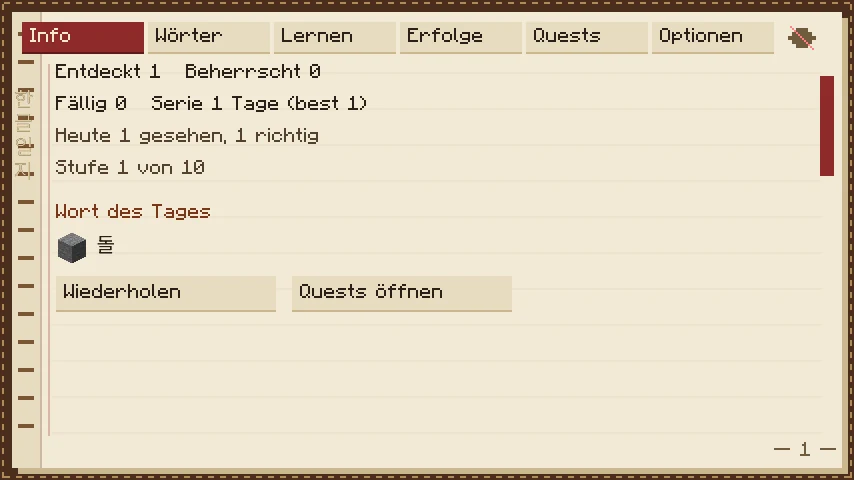
Eight tabs, switched with the row at the top:
| Tab | What is on it |
|---|---|
| Info | words discovered and mastered, due today, streak, level, the word of the day, “About reading Hangul”, and buttons to review or open the quest list |
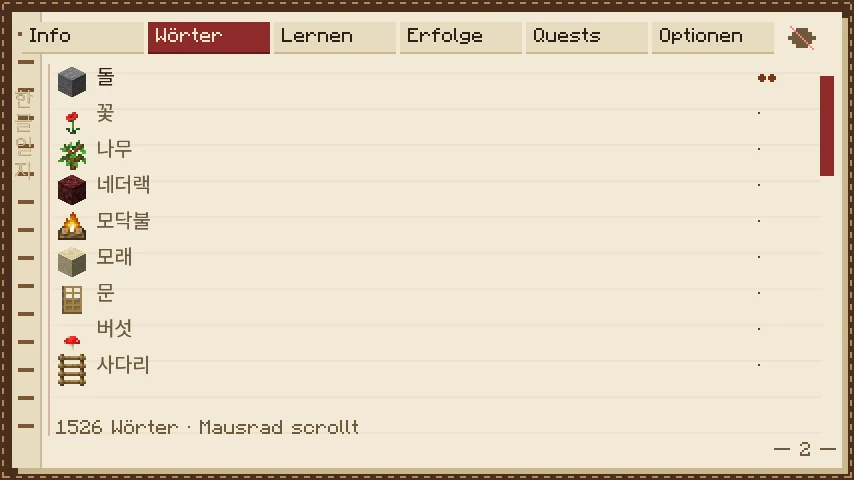
| Words | the dictionary: every word you have met, with Korean, the meaning in your language, status and origin; Sino-Korean families and homophone warnings |
| Study | due words as cards, plus the review trail |
| Achievements | the fifteen achievements with progress |
| Quests | the trail tree and the detail card of the selected trail |
| Grammar | the constructions you have met, with their rule cards |
| Books | graded stories and culture notes |
| Settings | language, HUD, windows, quest picking, new words per day, retention, sound, the quest folder |
Info
The dashboard. Counters are deliberately plain: discovered (met at least once), mastered (recalled on three study days, with a stable card), due (now), the streak with your best streak, today’s reviews and the number of correct answers. Review starts a review, Open quests jumps to the tree. About reading Hangul reopens the welcome screen.
Words
A full-text list of the vocabulary the mod knows: Korean word, meaning, status, and where the word came from:
- curated: a concept from
concepts.json, with a hand-written easy-Korean description, - vanilla: an item, block, entity or biome name taken from the game’s language files,
- lute: imported from your Lute export.
The mouse wheel scrolls, the search field filters by Korean or by meaning. Words you have not met yet are not shown, so the list is a record of your own journey rather than a dictionary dump.
Study
Due words, one card at a time. The kind of card depends on the word: a four-option choice, a recall you grade yourself, syllable tiles, and for words that are already stable a typed answer on a built-in 두벌식 keyboard (Settings → Typed cards turns that off). Answer honestly: the schedule is FSRS-6, and a wrong answer brings the word back soon.
The review trail (복습의 길) is the same words as a quest: it is generated from today’s due words and changes daily. Use it when a card session feels too abstract.
Achievements
Fifteen achievements across vocabulary, mastery, reviews, streak, animals, blocks, questlines and sidequests. They unlock silently when their condition is met. They are a nudge, not a gate: nothing in the mod requires them.
Grammar and Books
Grammar lists the constructions you have met, one rule card each. Books holds four short stories (they open when you know 98% of their words; a locked one lists the words to learn first; hover a word for its gloss) and the culture notes (온돌, 한옥, 김치, 설날 and more) that also appear once as a card when you first craft or find the matching item.
Quests
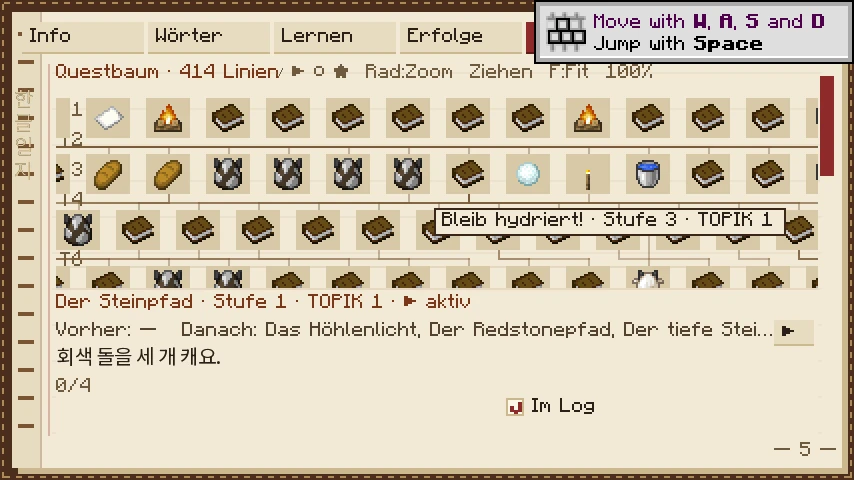
The tree. Each node is one trail, coloured by state. It shows only what is useful now: the trails you can start, the ones in your quest log, and, greyed out, the ones waiting directly behind them. Everything further away is hidden, and finished trails are folded into a “완료 · Completed” button. Tick “Show all trails” (here or in Settings) for the whole map.
- done — finished, badge earned,
- active — one of the trails in your quest log (up to four: three regular slots and one situational; the game fills them and picks the next one when you finish, unless you switch the setting off),
- open — unlocked but not started,
- locked (greyed) — shows what it is waiting for (for example “after 돌의 길”, or a number of known words).
The game keeps the quest log filled: three regular quests that fit the start of the game (wood, stone, food) and, when you finish one, the next one right after it. A fourth slot follows where you are: a snow trail in the snow, a cave trail underground. Quests you tick yourself are never replaced; take one out and it stays out for 30 minutes of play. Switch “Pick quests automatically” off in Settings to choose everything yourself.
Selecting a node shows the detail card: Korean title, level, TOPIK band, state, parents,
children, progress (2/4), the live status of the current step, a checkbox and a start button.
- In log (checkbox) is the important one: ticked quests are drawn on the HUD and their goals are checked against the world. Unticked quests keep their progress but are paused.
- Start ticks the quest and starts it; Focus highlights a quest that is already in the log.
- State reads
▶ activefor the highlighted quest,▸ in logfor the other ticked ones,○ openfor a quest that is unlocked but not in the log, and· lockedfor a locked branch.
Parent trails are listed before their children, and the list scrolls.
Settings
| Setting | Effect |
|---|---|
| Quests | turn the quest system on or off |
| Quest tracker | show the sentence and status in the corner |
| HUD cards | step, sidequest and trail cards |
| Tooltips | word tooltips on items |
| Auto quiz | the ambient quiz that appears while you stand still |
| Auto-close windows | HUD windows (hint, rule cards, banners, the quiz prompt) close by themselves after a few seconds instead of waiting for the hint key (off by default) |
| Pick quests automatically | the game fills the quest log (on by default) |
| Show all quest trails | the whole tree instead of the focused view |
| Language | Auto (follows the game), English, Deutsch, Español, Français |
| Translations in quests | add a line in your language under the Korean (off by default) |
| New words per day, Desired retention | how many new words a session adds, and how sure the scheduler tries to keep you of old ones |
| Typed cards | allow typed answers on stable words |
| Sound | celebration sounds |
| Lute import | read vocab/lute-vocab.csv at start-up |
| Reset progress | wipe the journey; asks for a second click and writes a backup first |
Underneath, the tab reports what the Lute import did (12 words imported, 3 skipped). The corners, card duration and
quiz interval are in config/hangulquest/config.json; see Files and backups.