Playing
The quest log
When quests are tracked, the top-left corner shows a quest log: no panel, just shadowed text on the world, two short lines per quest.
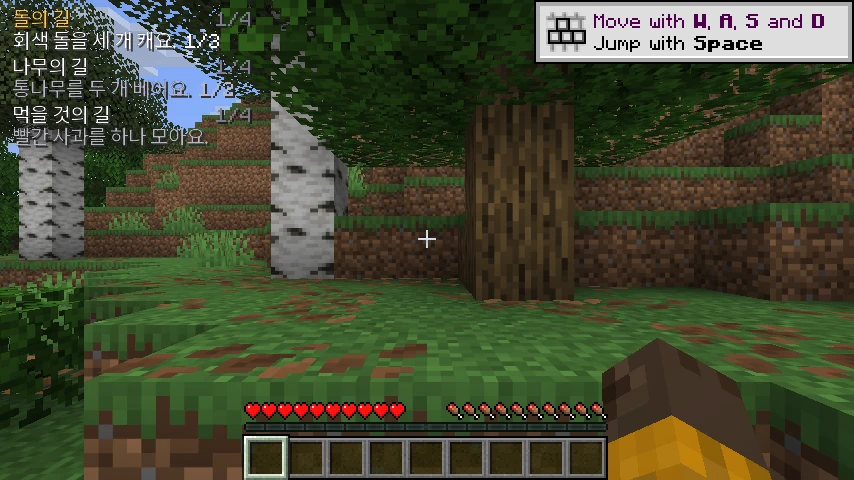
Each quest reads:
| Part | Example | Meaning |
|---|---|---|
| title | 돌의 길 | the trail’s Korean title; the highlighted quest is gold |
| step | 1/4 | which step of the trail you are on, finales included |
| objective | 회색 돌을 세 개 캐요. 1/3 | the current Korean sentence, with the count of the goal right after it |
| status | 지금 낮 · 밤 필요 | only when a condition is missing — time, weather, biome, dimension, a mob nearby |
Counts are inline (1/3) instead of a bar, and there is no background box, so the log stays small even
with several quests open.
The status line is generated from the goal, so it always answers the question the sentence raises:
| What you see | What it means |
|---|---|
1/3 | one of three stone broken, collected or placed — depending on the goal |
지금 낮 · 밤 필요 | it is day; the step needs night |
Y 62 / 140 위 | you are at Y 62 and the goal wants Y 140 or higher |
지금 평원 · 산 필요 | you are standing in plains, the step wants a mountain biome |
가까이에 좀비 필요 | no zombie within range yet |
보는 중 … 62% | keep looking at the block or mob a little longer |
Every condition of a step is spoken inside the sentence itself — 해변에서 모닥불을 놓아요., not just
모닥불을 놓아요. — so the text and the check can never disagree.
What is in the log
The game keeps the log filled for you. It holds up to four quests: three regular ones that fit the start of the game (wood, stone, food) and a fourth, situational slot that follows where you are (a snow trail in the snow, a cave trail underground). When you finish one, the next one follows. A message says when the game has picked quests for you.
You can still curate it. In the journal’s Quests tab, select a trail and tick In log in its detail card: the quest appears in the HUD and starts advancing.
- Quests you tick yourself are never replaced by the game. A quest you take out stays out for 30 minutes of play.
- Only tracked quests advance. An untracked quest keeps its saved step, counter and hints, but nothing about it is checked against the world, so a quest can never complete behind your back while you work on a different one.
Vmoves the highlight. The list keeps its order, only the gold title moves, soVwalks through every tracked quest and wraps around. Hints (H), the sidequest and the follow-up chain work on the highlighted quest only.- Finishing the highlighted quest starts or offers its successor. Finishing any other tracked quest shows a banner and leaves the highlight alone.
- Settings → Pick quests automatically switches the game’s choice off; then the log holds only what you tick.
The detail card also has a Focus button for a quest that is in the log but not highlighted.
How many rows the HUD draws is questTrackerRows in config/hangulquest/config.json (1 to 6, default 4).
Windows stay until you close them
Hints, rule cards, culture notes, word cards, banners, the quiz prompt, the next-quest popup and the completion
cards no longer disappear on a timer. Each shows its key ([H] 닫기 · close); one press of H closes exactly one
window, the top one. If more are waiting, a “+N” badge says how many. Closing a window is never a hint: the press
does not mark the step as helped, start a sidequest or change the grading. No window covers the crosshair or the
hotbar. If you prefer the old behaviour, switch Settings → Auto-close windows on.
A step
- Read the sentence.
- Do it. The mod watches the world locally: blocks you break or place, items you gain or eat, what you look at long enough, the biome, dimension and altitude you are in, right-clicks and interactions.
- When the check passes, a card appears with the next clue and that quest’s row moves on.
Nothing is ever sent to the server, and nothing can be “cheated” in a way that matters: the mod trusts your client because the only person you could cheat is yourself.
After a step: the finale
Every trail ends with a ritual finale: the same goal-and-condition rules, but always something you can do in any world — light a torch on a mountain at night, ring a bell at dawn, place a campfire on a beach. That is deliberate. No trail ever asks for a structure, a chest, a coordinate or a rare biome, so no trail can be unfinishable because of world generation.
Finishing the finale gives the big card: the trail’s Korean title, the closing line, the translation line if you enabled it, the badge, a fanfare, a level-up sound and fireworks. The badge stays in the journal.
What happens next
- If exactly one follow-up trail is unlocked, it starts by itself.
- If several are, a card offers up to five of them. Press
1–5; if you do nothing, the first one starts after 60 seconds. - If the next trail is still locked (it wants another parent, or more known words), the mod starts the missing prerequisite instead, so you are never left without a quest.
- Abandoning is allowed and costs nothing. The trail is paused where you left it — step, partial counter,
hint state and sidequest — and resumes exactly there when you come back. Progress in the journal shows
as
2/4.
The HUD
The vanilla HUD stays as it is. Hangul Quest adds three non-modal elements:
- the quest log (top-left by default),
- the word card when you look at a block or mob that is in your vocabulary,
- windows and celebration cards (hints, rule cards, banners, the quiz prompt), which never capture input.
All of them can be moved or switched off in the journal’s options; F8 hides the quest HUD entirely
while you build.
Keys
| Key | Action | Change it under |
|---|---|---|
K | Open the journal | Controls → Key Binds → 한글 탐험 |
H | Close the top window; otherwise show the hint / start the sidequest | same |
J | Review due words now | same |
R | Answer a waiting review prompt | same |
V | Move the highlight through the quest log | same |
F8 | Toggle the quest HUD | same |
1–4 | Answer a quiz or sidequest question | same |
1–5 | Pick the next trail | same |
Esc | Close the journal or a card | — |
Playing in a group
The mod is per-player and invisible to everyone else. On a server, each player can run it independently; there is no shared state and no server-side component. If you play with someone who also uses it, you will simply each have your own quest log.
A sensible first session
Do the first branch for ten minutes with the hint key, then turn the hint off for one trail and see how far you get. The vocabulary you keep meeting — stone, wood, torch, bread — is the vocabulary the early tree is built from, and it reappears in later trails on purpose.